25–26 November 2026 · Badia Polesine
AI practical
labs
Transforming Everyday Work
with AI Tools & Agents


Two days of hands-on AI
| Time | Day 1 Wednesday · 25 November | Day 2 Thursday · 26 November |
|---|
| 09:00–11:00 |
IntroductionsMeet the group and share a goal.
AI at Work · Abafoods and CogniteX future.
Two companies, a new way of working.
|
Day one recapShare one idea from yesterday.
What to automateIdentify tasks that suit automation.
|
| 11:00–13:00 |

Tool setupCheck access together.
Know your tools!Processes with Copilot and AIcotone.
|
Build a workflowBuild your own agent
|
| 13:00–14:00 |
|
| 14:00–17:00 |
Lab 1 · Bring your own caseTry automating a recurring Abafoods task.
|
Lab 2 · Build on your caseTest a workflow with your own inputs.
|
| 17:00 |
Wrap up and look aheadLook ahead to tomorrow.
|
Wrap up and look aheadChoose your next step.
|
Day 1 · 09:30
Day in the Life
of an AI-Powered
Brand
The Abafoods 2027 Scenario

The AI-Powered Brand
What if your
brand could
work as one?
Opportunity identified
Signal dossier
At-home lattes
Search interest ↗
Oat drink sales ↗
Est. margin
National12%
Pilot18%
Matcha
at home
Buyer
proposal
Prior sales lift
- Shelf only
- +2%
- Tastings
- +7%
The agent adds evidence from home-latte searches and oat drink sales to the product brief for Finance.
Matcha at home
- Market brief
- Growth plan
- Campaign kit
- Pilot results
Market Radar
- Always listening
- Track shoppers, rivals and shelves.
- Connect the signals
- Match market trends with Bjorg sales.
- Spot opportunities
- Find an unmet shopper need.
- Ready for action
- Brief Marketing, Sales and Finance.
Signal desk
Illustrative data
Next test from Finance
Consumer agent
Retail agent
Sales agent
Market question
Is there demand for matcha at home?
Compare demand, shelf space and Bjorg sales.
Opportunity brief · Illustrative data
At-home matcha moments
Test Bjorg Avena Matcha for iced lattes at home.
- Consumer demand
- Searches rose 34%. In 18 of 40 reviews, shoppers wanted to skip the whisk.
- Retail opportunity
- Three single-serve launches. Only 2 of 12 stores stocked multi-serve matcha oat drinks.
- Where to test
- Start in the sampled stores. Bjorg oat sales there grew 12%.
Growth Simulator
- Compare strategies
- Test prices, promotions and channels.
- Forecast returns
- See sales, profit and spend.
- Align teams
- One forecast for Marketing, Sales and Finance.
- Choose a plan
- Back the most profitable route within budget.
- Launch spend
- Net revenue
- Profit
Campaign &
Sales Studio
- Build the campaign
- Turn the growth plan into a campaign.
- Create at scale
- Adapt visuals, video and copy for each channel.
- Equip Sales
- Tailor the pitch and offer to each retailer.
- Stay aligned
- Use the same branding, message and terms.
Your Matcha Moment
Marketing agent
Sales agent
Inside CogniteX
The AI-Native
Company
How people and AI agents work together

How does an AI-native company
actually work?
Second Brain
- Find knowledge across documents, meetings and projects.
- Understand what was decided and why.
- Reuse what the team has already learned.
- Get answers linked to the original sources.
Your Digital
Colleague
- Less follow-up
- Turn meeting decisions into assigned tasks.
- Faster execution
- Start the work while the conversation is still happening.
- Work in parallel
- Delegate tasks to agents across different functions.
- Stay in control
- Review results and approve the next steps.
Matcha Avena launchSimulation
 EA
Eugenio
 Giovanni
ListeningClaude · Design
A matcha break, on ice
Pair the green carton with a clear glass of iced matcha. Keep the Bjorg name visible in the shelf display.
ListeningClaude · Marketing
- Audience
- Iced-matcha drinkers shopping in the pilot stores.
- Message
- Your afternoon matcha, ready to pour over ice.
- First test
- Pair a shelf card with an in-store tasting. Track cartons sold during tasting hours.
ListeningClaude · Finance
Illustrative budget for a 20-store pilot
- Shelf cards and artwork
- €600
- Tasting stock
- €900
- In-store staffing
- €900
- Total to approve
- €2,400
ListeningClaude · Sales
Subject · Matcha Avena pilot
Hi Alex,
Could we try Matcha Avena in 20 stores for two weeks? We’d supply shelf cards and host tastings, then review sales together.
Which stores would you shortlist?
Software
on Demand
- The brief
- “Help us choose which oat drink to take to our next tasting.”
- The tool
- An AI agent turns the brief into a voting app the product team can try on the spot.
- One small change
- Let tasters change their minds after a second sip. Count only their latest pick.
Taste LabSample data · 19 votes
Which flavour would you try?
Tasting results
What if all
your agents
worked together?
- Fewer missed requests
- Capture actions from meetings and emails.
- Less coordination
- Pass tasks and context between agents.
- Faster delivery
- Keep work moving across connected tools.
- Stay in control
- Review results and approve releases.
Request inboxSelect an agent to inspect a handoff, or start a new request.
The promise
Tomorrow you leave using what you already have at 100% of its potential.
Copilot · Word · PowerPoint · AIcotone. Already on your laptop, already paid for.
How we do it
Not a tour of the buttons. Processes.
Start
A task you already do
Every workflow begins from work that is on your desk every month.
Chain
Tools in sequence
One tool's output is the next tool's input. That is where the time goes away.
Repeat
Same steps on Monday
You learn the features along the way, because you need them.
Before anything else
Get set up: three things, ten minutes
- Which licence do I have? Half of you have premium, half Basic. Sit in pairs: one of each.
- Choose the model. Not “Auto” for real work.
- Tell it who you are, once, in your personal instructions.
Workflow 1
The perfect
deck
A notebook that knows its job → one content document → PowerPoint on your brand kit.
The whole path
From four files to a deck, in three moves
- Notebook: your files, and instructions that say “content only”.
- Word: it asks what you want to show, then writes by topic.
- PowerPoint: your brand kit, the document, one request.
Step 1 · Copilot Notebook
First the content: one document, before any slide
Set up once
Give it instructions
⋯ → Instructions. Its job: ask me what I want to show, then summarise by topic. Never design slides.
Drop in
Everything you have
The call transcript, your notes, the market export, the sales trend. All in one notebook.
Ask
It asks, then it writes
Audience, trends, highlights, problems, actions. You confirm, and a Word document comes out.
Hands-on: 10 minutes, with your own material.
Step 2 · PowerPoint + brand kit
Then the look: your brand, one line of prompt
Set
Brand and model
+ → Select a brand → your brand kit. Choose a model instead of Auto.
Ask
Attach the document
“Create a presentation from this document for the monthly business review with the marketing director and the sales director (20 minutes).”
Get
A deck on your brand
Cover, charts, logo and colours. Images: brand and AI. Then read every number.
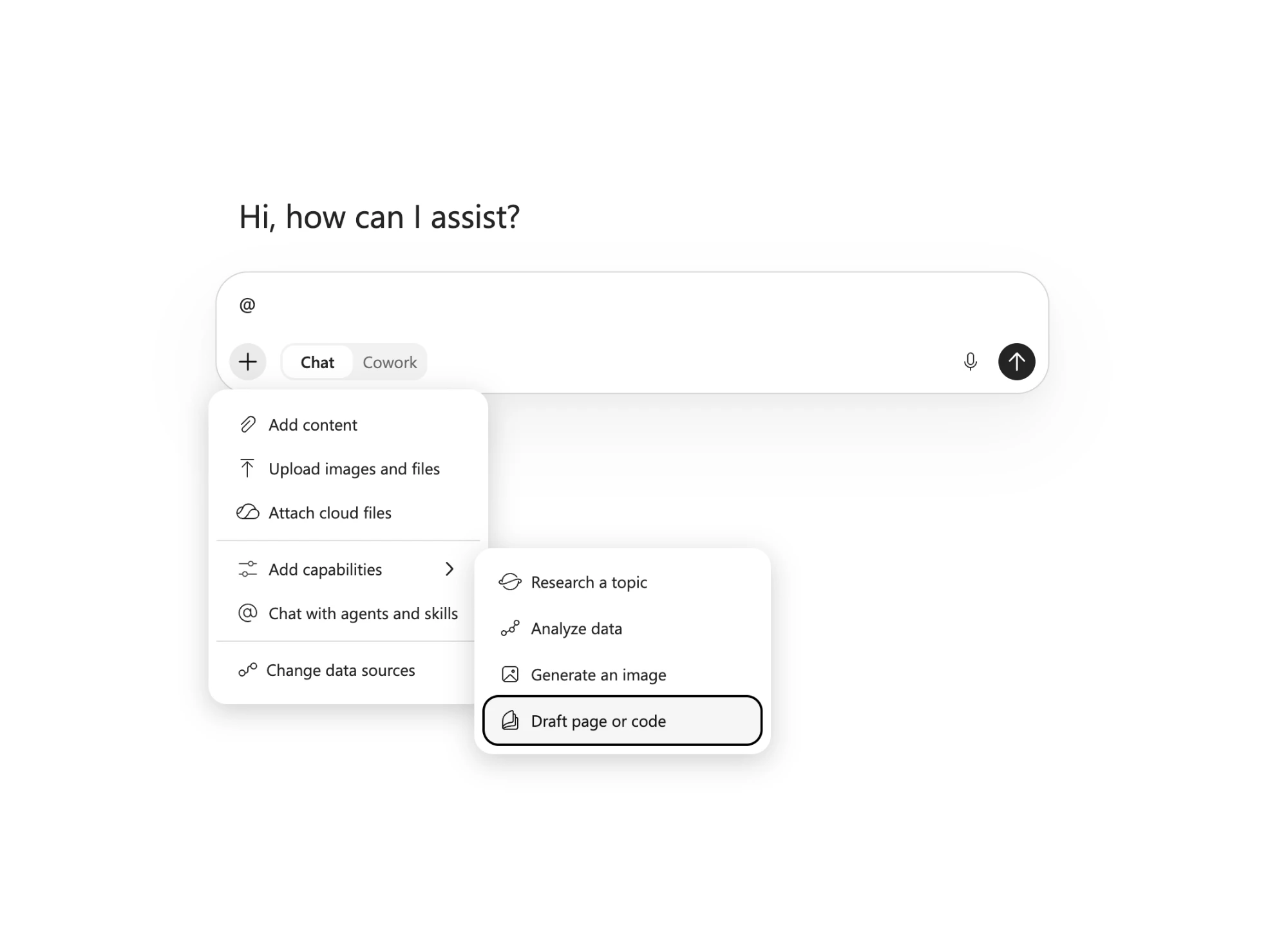
Step 3 · Copilot · Draft page or code
Same brief, no slides: a web page
- Same content document, attached in Copilot chat.
- + → Add capabilities → Draft page or code.
- Ask for one interactive page instead of twenty slides.
- Same rule: read every number before it leaves your hands.
TODO test Draft page or code on the demo account with the content document
Workflow 2 · Copilot Agents → Researcher
Ask a question, get a report with sources
Product launch analysis
“How did oat barista launches do in Italian supermarkets in the last two years? Price, format, what failed.”
Prepare for a meeting
“Prepare me for Thursday with this buyer: our last emails, open points, their recent news.”
Analyze data
“Attached: the market export. Which areas and channels drive the drop in infusions? Show the numbers.”
Market trend analysis
“Plant-based drinks in Italy and France, 2025–26: trends, new entrants, private label share.”
Copilot app → Agents → Researcher. Web + your mail, files and meetings. It asks first, works for a few minutes, cites every source. Premium licence.
Stop 1 again · Copilot
The signal: research on a market you have no data for
- Ask for sources, and open two of them.
- Say what you will do with the answer: a go / no-go on a new category.
- If a number has no source, it is a guess.
Stop 1 again · AIcotone
AIcotone: what is inside, and where it fits
Images
Pack shots and generation
Start from the real pack. Choose the format for where it will be used.
Check
Heat map
Where the eye goes on a pack or a layout. An indication, to be read with judgement.
Research
Amazon research
Bestsellers and categories: a second source for the signal.
Live on the platform. Five-minute map first, then the three modules that serve the launch.
TODO walk through AIcotone with the external access before the 25th; confirm which modules work
Stop 2 again · Copilot in Excel
The numbers: from an export to an answer
- Turn the range into a table first.
- Ask one question at a time.
- “Use only this data. If something is missing, tell me.”
- Check one number by hand.
Hands-on: 10 minutes, in pairs, on the market export.
Stop 4 again · PowerPoint
The shelf: from the Excel to the deck
- Name the file, the audience and the number of slides.
- Say what the room always asks: why it moved, what next.
- Then read every number. The deck is a draft, with its assumptions written down.
Stop 4 again · Outlook
The shelf: the follow-up, in your own voice
- Three emails you really sent teach your tone better than any description.
- It drafts. You send.
- A missing fact becomes “[to confirm]”, never an invention.
Hands-on: 10 minutes, on a real email in your inbox.
Stop 6 again · Agents
The glue: stop repeating yourself
- When you explain the same thing a third time, make an agent.
- Give it only the essential context.
- Share it with the colleague who does the same job.
- Write the limit into it: what it must never do.
To ask for · Copilot Cowork
It does not answer. It does the work.
Actions
From request to result
Reads your mail, Teams and files, writes the report, drafts the email and the deck. Stops and asks before anything risky.
Small automations
Every day at 8:00
Set a task once: competitor news, a client's open points, ready in your inbox before you arrive.
Live: meeting prep for Gruppo Aurora, one request.
The red lights
What to ask for
Paid
Copilot Studio
Agents with triggers and connectors, working without you in front of the screen.
Paid
Workflows
Fixed steps that run on a schedule: the report that arrives every Monday.
A project
Connected systems
Anything that touches SAP or needs one shared source of data. Ask for it with a clear case in hand.
Part 3
Your case,
your data
In pairs, on something you really do every month.
The rules
Three rules for the afternoon
1
Your real files
Inside Copilot, on your own laptop. Nothing leaves the company.
2
In pairs
One premium licence, one Basic. You work on the premium laptop and swap the keyboard.
3
Leave with something
A saved prompt or an agent you will use again on Monday.
No files with you, or files you cannot open here? We have a ready kit for every case.
Choose one
Six cases to start from
| # | Case | Mostly for |
|---|
| 1 | A market export becomes a report with charts and comments, then slides | Marketing |
| 2 | A market and its competitors, for a product you do not sell yet | Marketing |
| 3 | A newsletter to buyers for a launch, with images | Marketing, sales |
| 4 | Prepare a customer meeting: where they are below potential, the price map | Sales |
| 5 | A customer listing form: find the errors, fill it from master data | Sales |
| 6 | The month-end deck, or keeping the budget under control | Finance |
Or your own: the task you brought with you beats all six.
Close
Back to the traffic lights
Which light did you turn green today?
One question each:
what do you want to be able to do better tomorrow?
 · Helped publishers grow ad revenue through AI and programmatic advertising.
 Ambassador for Italy. Brings the community together to build and share workflows.
 , an AI platform that turns product data into images and descriptions for online stores.
 , builds AI agents that take on repetitive work, from reading documents to drafting reports.